Phishing Scams Explained
Phishing scams are fake messages. They try to trick you. They want your passwords or bank details. You can learn to spot them. This helps keep your information safe.
What Are Phishing Scams?
Phishing is like fishing. But instead of fish, scammers want your personal stuff. They cast a wide net online.
They send out fake emails, texts, or messages. These messages look like they come from trusted places. Think of your bank, a popular store, or even a friend.
The goal is simple: trick you into giving up sensitive data.
This data includes things like your username and password. They also want credit card numbers. Social Security numbers are a big target.
Even personal details like your birthday can be used. Scammers use this information for bad things. They might steal your money.
They could open new accounts in your name. Sometimes, they just want to log into your accounts.
These scams are very common. They happen every day to millions of people. The scammers get smarter all the time.
They try to make their fake messages look very real. This can make it hard to tell what’s fake and what’s not. But there are signs to look for.
Knowing these signs is your best defense.
How Phishing Scams Work
Phishing works by using your trust. Scammers pretend to be someone you know or trust. This is called impersonation.
They might say there’s a problem with your account. Or they might offer you something amazing, like a prize. The message often creates a sense of urgency.
This makes you act fast without thinking too much.
For example, you might get an email. It says your bank account is locked. It says you need to click a link right away.
This link takes you to a fake website. This website looks just like your bank’s site. When you try to log in, the scammers grab your username and password.
Now they have access to your real bank account.
Another common tactic is a fake invoice. It looks like a bill you owe. It might say you owe money for something you didn’t buy.
It tells you to click a link to cancel it. Clicking the link might download a virus. Or it could lead to a fake payment page.
Common Phishing Triggers
Urgency: “Act now or your account will be closed!”
Fear: “Unauthorized login detected on your account.”
Excitement: “You’ve won a free gift card!”
Curiosity: “See who viewed your profile.”
Types of Phishing Attacks
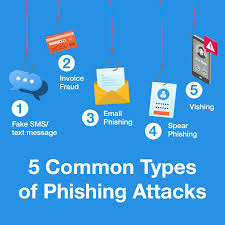
Phishing isn’t just one thing. There are many ways scammers try to trick you. Understanding these different types helps you see them coming.
Spear Phishing
Spear phishing is more targeted. Scammers do some research. They find out about you.
They might know your name, your job, or your company. Then they send a message just for you. It feels very personal.
This makes it harder to spot.
For instance, a spear phisher might email you. They pretend to be your boss. They ask you to buy gift cards.
They say it’s for an urgent company matter. Because it looks like it’s from your boss, you might do it. But it’s a scam.
Whaling
Whaling is like spear phishing. But it targets high-profile people. Think CEOs or top managers.
The goal is to get big rewards. They might ask for company secrets or large sums of money.
Smishing (SMS Phishing)
Smishing uses text messages. You get a text from an unknown number. It might look like it’s from your phone company.
Or it could be from a delivery service. It will ask you to click a link to track a package. Or it will say there’s a problem with your service.
I got a text once that said my Amazon order had an issue. It looked so real! It had a link to “fix” it.
I almost clicked it. But then I remembered I hadn’t ordered anything. I deleted the message.
It’s scary how convincing they can be.
Vishing (Voice Phishing)
Vishing uses phone calls. Scammers call you. They might pretend to be from the IRS.
They say you owe back taxes. They threaten to arrest you if you don’t pay. They want you to give them credit card details over the phone.
The IRS will never call you like this. They always send letters first. It’s important to know these facts.
You should always hang up on suspicious calls. Never give personal information over the phone to someone who called you first.
Smishing vs. Vishing
Smishing: Uses text messages (SMS).
Vishing: Uses phone calls (Voice).
Both aim to steal your information.
Recognizing Phishing Red Flags
Spotting phishing is key to staying safe. There are common signs that a message is fake. Learning these signs helps protect you.
Poor Grammar and Spelling
Many phishing messages have errors. They might have bad grammar. They could have misspellings.
Legitimate companies usually proofread their messages. While some errors can slip through, a lot of mistakes are a big warning sign.
I saw an email once from a supposed shipping company. It said my “parcel” was “waiting for collectiion.” The spelling mistake was obvious. Big companies don’t usually spell things wrong.
Suspicious Sender Email Addresses
Look closely at the sender’s email address. Scammers often use addresses that are close to real ones. They might use variations.
For example, instead of bankofamerica.com, they might use bankofamerica-support.com. Or they might use a completely random name with a common domain like @gmail.com.
Hover your mouse over the sender’s name. Don’t just click. This often reveals the actual email address.
If it looks odd, be careful.
Generic Greetings
Phishing emails often start with general greetings. They might say “Dear Customer” or “Dear Valued User.” If the company actually knows you, they usually use your name. Banks and online stores often use your first name.
If you get an email about your account, and it starts with “Dear Sir or Madam,” that’s a big clue it might be fake. They should know your name.
Urgent Requests or Threats
As mentioned before, scammers want you to rush. They might say your account will be closed. Or they might say you owe money and have to pay now.
This pressure makes you forget to check details. Real companies usually give you time to respond.
Requests for Personal Information
This is a major red flag. Legitimate companies will rarely ask for your password or full Social Security number via email or text. If you get a message asking for this, it’s almost certainly a scam.
Your bank will not email you asking for your PIN. Your online store will not ask for your credit card number again. If they need to update it, they will tell you to log into your account directly on their website.
Suspicious Links and Attachments
Be very careful with links in emails. Hover your mouse over the link. Look at the web address that appears.
Does it match the company’s real website? If not, don’t click.
Never open attachments from unknown senders. These could contain malware. Malware is software that can harm your computer or steal your data.
Even if the sender looks familiar, if the attachment seems out of the blue, it’s best to be safe.
Phishing Link Check
DO NOT CLICK: If the link looks strange.
VERIFY: Hover your mouse over the link to see the real web address.
GO DIRECT: If you need to check something, go to the company’s website by typing the address yourself.
My Own Phishing Scare
I remember a few years ago. I was busy with a project. Emails were flying in.
One looked like it was from PayPal. It said there was a suspicious login attempt. It said I needed to verify my account immediately.
My heart skipped a beat. I use PayPal all the time.
I started to click the link. Then I stopped myself. I looked at the sender’s email address.
It wasn’t from PayPal.com. It was something like “paypal-secure-login.net.” That looked wrong. Also, PayPal always uses my name in emails.
This one said “Dear User.”
I closed the email without clicking. I went to the PayPal website myself. I logged in.
There was no notification about a suspicious login. It was a relief, but also a shock. The fake email looked so real.
It showed me how easily anyone can be tricked if they aren’t careful. It really made me pay attention to every detail after that.
Protecting Yourself from Phishing
Staying safe from phishing is about being aware and taking smart steps. It’s not difficult, but it does require a little effort.
Use Strong, Unique Passwords
Don’t use the same password for multiple accounts. If one account is compromised, others might be too. Use a mix of letters, numbers, and symbols.
Consider using a password manager. It can create and store strong passwords for you.
Enable Two-Factor Authentication (2FA)
Two-factor authentication adds an extra layer of security. Even if scammers get your password, they still need another piece of information to log in. This is often a code sent to your phone.
Most major websites offer 2FA. Turn it on whenever you can.
Be Skeptical of Unexpected Messages
If you get an email, text, or call that you weren’t expecting, be suspicious. Especially if it asks for personal information. Take a moment to think before you act.
Ask yourself if it makes sense.
Never Share Sensitive Information via Email or Text
Your bank, credit card company, or other legitimate services will not ask for your password, Social Security number, or full credit card details through email or text. If you get such a request, it’s a scam.
Keep Your Software Updated
Software updates often include security patches. These fix holes that scammers could use. Make sure your operating system, web browser, and antivirus software are always up to date.
Use Antivirus and Anti-Malware Software
Good security software can help detect and block malicious links and downloads. It’s another line of defense against phishing and other online threats.
Educate Yourself and Others
The more you know about phishing, the better you can protect yourself. Share this information with your family and friends, especially older adults or younger people who might be less familiar with online risks.
Quick Security Checklist
Passwords: Strong and unique?
2FA: Enabled on important accounts?
Messages: Unexpected requests?
Links: Verified before clicking?
Software: Updated regularly?
Security: Antivirus active?
What to Do If You Suspect a Phishing Attempt
If you think a message is a phishing attempt, don’t ignore it. Take these steps.
Do Not Click or Reply
Do not click any links. Do not download any attachments. Do not reply to the sender.
Any interaction can confirm your email address is active. It might lead to more scams.
Report the Phishing Attempt
Most email services have a way to report phishing. Look for an option like “Report Spam” or “Report Phishing.” This helps the email provider block similar messages in the future.
You can also report it to the company being impersonated. For example, if it looks like a fake Facebook message, report it to Facebook. This helps them protect their users.
Delete the Message
Once you have reported it, delete the message from your inbox and trash folder.
What to Do If You Fell for a Phishing Scam
It’s easy to make a mistake. If you think you have fallen victim to a phishing scam, act fast.
Change Your Passwords Immediately
If you gave away a password, change it right away. Do this for the affected account. Also, change it for any other accounts that use the same password.
Use a strong, unique password.
Contact Your Bank or Credit Card Company
If you shared financial information, like credit card numbers or bank account details, call your bank or credit card company. Tell them what happened. They can help protect your accounts and monitor for fraud.
Monitor Your Accounts
Keep a close eye on your bank statements and credit reports. Look for any unauthorized activity. Report any suspicious transactions immediately.
Report the Incident
You can report phishing scams to the Federal Trade Commission (FTC) in the U.S. This helps authorities track and stop these scams. You can visit FTC.gov to report it.
If You’ve Been Phished
Step 1: Change passwords.
Step 2: Contact your bank/cards.
Step 3: Watch your accounts.
Step 4: Report to FTC.
Real-World Scenarios and Examples
Let’s look at some common phishing scenarios you might encounter.
Fake Online Shopping Deals
You see an ad on social media. It shows a popular item at a very low price. You click the link.
It takes you to a website that looks like a known store. You enter your credit card details to buy it. The item never arrives.
The website was fake. They stole your card details.
Impersonating Tech Support
You get a pop-up message on your computer. It says your computer is infected with viruses. It tells you to call a phone number for Microsoft support.
You call. The person on the phone tells you to grant them remote access to your computer. They then install malware or charge you for fake services.
Remember, Microsoft or Apple will not contact you directly like this about virus problems. They fix these issues through their software updates.
Fake Charity Scams
After a natural disaster, you might see emails asking for donations. They look like they are from a real charity. But they are fake.
The scammers collect the money. They never give it to charity. Always donate through the charity’s official website.
Lottery or Prize Scams
You get an email or letter saying you’ve won a lottery or a big prize. To claim it, you need to pay a fee or provide personal information. There is no prize.
They just want your money or your data.
Understanding the Psychology of Phishing
Why do people fall for phishing? It plays on our emotions and common human behaviors.
Fear and Urgency
As we’ve seen, creating a sense of panic works. When we feel rushed, we don’t think clearly. A threat to our money or identity makes us react quickly.
Greed and Desire
Who doesn’t like a good deal or a prize? Scammers exploit this. They offer things that seem too good to be true.
This makes people lower their guard.
Trust in Authority
We tend to trust messages from banks, government agencies, or well-known companies. Scammers use official-looking logos and language to mimic this authority.
Helpfulness and Obligation
Sometimes, messages pretend to be from someone needing help. Or they might offer to “help” you with something. This can make people feel obligated to respond.
Phishing Psychology
Plays on: Fear, Greed, Trust, Obligation.
Goal: Make you act without thinking.
Defense: Pause and think.
Phishing in the Age of AI
Artificial intelligence is changing many things. It’s also making phishing scams more sophisticated.
More Realistic Fake Content
AI can create very convincing fake text and even images. This means phishing emails and messages can look even more real. They might have perfect grammar and tailored language.
Deepfakes in Vishing
AI can be used to create deepfake audio. This means a scammer could fake a voice of someone you know. They might call you pretending to be a family member in trouble.
This makes vishing even scarier.
Personalized Attacks
AI can help scammers analyze large amounts of data. This allows them to create highly personalized phishing attacks. They can tailor messages to your specific interests and habits.
The best defense is still staying aware. AI makes the messages look better, but the core tactics often remain the same. Always question unexpected communications, no matter how real they seem.
What This Means For You
Phishing scams are a real threat. But they don’t have to control your online life.
When It’s Normal (To Be Cautious)
It’s normal to feel a little nervous when you get a strange email. It’s also normal to double-check things. Being cautious is smart.
It means you’re paying attention.
When to Worry (and Act Fast)
You should worry if you’ve clicked a link you regret. Or if you’ve given out personal information. Or if you notice strange activity on your accounts.
These are times to take quick action.
Simple Checks You Can Do
Check the sender’s email address. Does it look right?
Read the message carefully. Are there errors? Is it urgent?
Hover over links. See where they actually go.
Don’t trust caller ID. Scammers can fake phone numbers.
Simple Security Checks
Sender: Verify email address.
Message: Look for errors & urgency.
Links: Hover to check destination.
Calls: Never trust caller ID alone.
Quick Tips for Online Safety
Here are some easy ways to stay safer online.
- Pause Before You Click: Always take a second to think.
- Verify Requests: If unsure, contact the company directly.
- Use Security Software: Keep it updated.
- Educate Family: Talk to kids and older relatives.
- Be Wary of Public Wi-Fi: Avoid sensitive tasks.
Frequently Asked Questions
What is the difference between phishing and malware?
Phishing is a scam to trick you into giving up information. Malware is harmful software that can infect your computer. Sometimes, phishing can lead to malware being installed.
For example, by clicking a malicious link or opening a bad attachment.
Can phishing happen on social media?
Yes, phishing can definitely happen on social media. Scammers might send direct messages that look like they are from friends. Or they might post fake links or ads.
Always be cautious of unexpected messages or offers on social media platforms.
How do I know if an email is really from my bank?
Your bank will never ask for your password, PIN, or full Social Security number via email. They will also often use your name in emails. If you receive an email that seems suspicious, do not click any links.
Go directly to your bank’s official website by typing the address yourself, and log in to check your account.
What should I do if I clicked a phishing link?
If you clicked a phishing link, do not enter any information. If you did enter information, immediately change your password for that site. Also, change passwords on any other sites where you use the same password.
Contact your bank or credit card company if you shared financial details.
Are phishing texts (smishing) dangerous?
Yes, smishing texts can be very dangerous. They often contain links that can lead to malware. Or they might ask you to reply with personal information.
Treat all unexpected text messages with suspicion. Never click links or give out data.
How can I protect my parents from phishing scams?
Talk to them regularly about phishing. Show them examples of fake messages. Advise them to always pause and think before clicking links or sharing information.
Encourage them to contact you if they are unsure about a message. Help them set up strong passwords and two-factor authentication.
Conclusion
Phishing scams can be tricky, but they are beatable. By understanding how they work and looking for red flags, you can protect yourself. Stay aware, be skeptical, and always verify.
Your online safety is in your hands.